Uploading bank statements to Ramp
Overview
If you have manually linked a bank account to Ramp, you are required to upload bank statements periodically so Ramp can verify account balances, confirm ownership, and comply with banking regulations.
Tip: If your bank supports a direct connection, you can avoid manual statement uploads. Direct connections share balance and ownership information with Ramp automatically. See Ramp bank connections overview to check whether your bank is eligible and set up a direct connection.
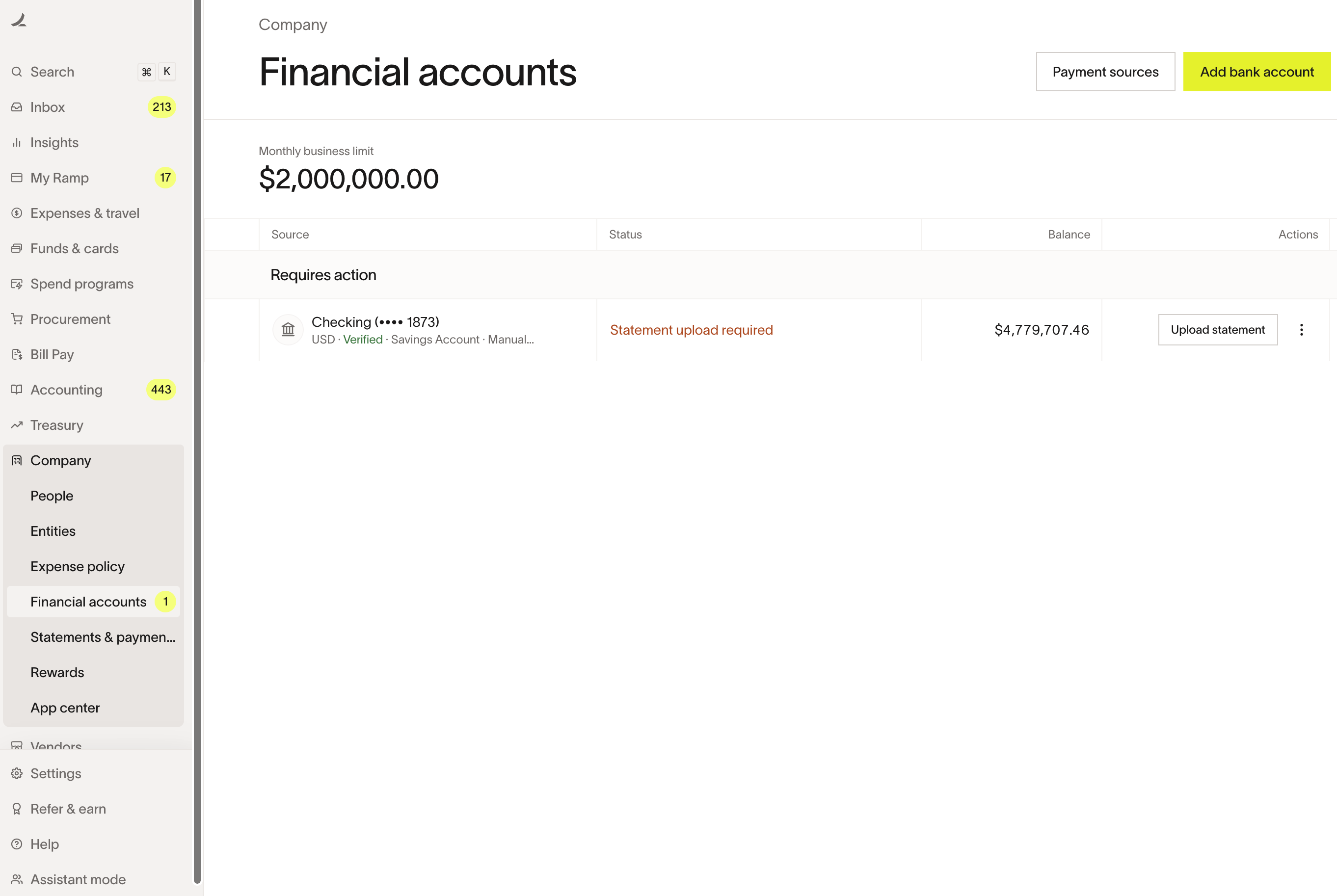
You can upload statements from the Financial accounts page on Ramp (Financial Accounts > Linked Accounts). Accounts that need a new statement display a Statement upload required label or an Upload statement button.
Ramp sends periodic reminder emails to the designated point of contact when a new statement is needed. The recipient can be any Ramp user with an Accounting, Admin, or Business Owner role.
Note: If Ramp asks you to upload financial statements such as balance sheets or profit and loss statements as part of a routine account review, that is a separate process from bank statement uploads. See Routine Credit Account Review overview for details.
How to upload a bank statement
- Go to Financial accounts (Financial Accounts > Linked Accounts).
- Find the account that requires a statement upload.
- Click Upload statement.
- Upload a PDF of your most recent bank statement (up to 50 MB).
What your bank statement should include
Upload a recent, complete bank statement that clearly shows:
- Business name — must match the name on your Ramp account
- Last four digits of the account number
- Statement period — the date range the statement covers
- Account balance(s)
Statements must be in PDF format. Screenshots, photos of documents, or other file types are not accepted for this upload.
If you do not have bank statements
If you recently opened your bank account and do not yet have a full statement, you may be able to provide a bank verification letter instead. A bank verification letter should include:
- The name of your business
- The date of the letter
- The last four digits of the account number
- The bank account's current balance
For more details on bank verification letters during the application process, see Applying and signing up for Ramp (U.S. based).
Frequently asked questions
Where can I find my bank statements?
Sign in to your business's banking portal and look for a Statements or My Documents section. Download your most recent statement in PDF format.
Who can upload bank statements?
Any Ramp user with an Accounting, Admin, or Business Owner role can upload bank statements from the Financial accounts page.
Can I avoid uploading bank statements?
Yes, if your bank supports a direct connection. Direct connections share balance and account information with Ramp automatically, so you do not need to upload statements. Go to Financial accounts and click Add linked account to search for your bank. If your bank is listed, you can switch from a manual connection to a direct one. For setup steps, see Ramp bank connections overview.
What is the difference between a bank statement upload and a financial review request?
Bank statement uploads are for verifying balances on manually linked bank accounts. Ramp may also request financial documents — such as balance sheets and profit and loss statements — as part of a routine credit account review. These are separate processes. If you see a task on your Ramp homepage asking you to upload financial statements, refer to the account review article for guidance.